
Best approaches for website hosting backups
Picture this: I'm sitting at my desk, coffee in hand, finally wrapping up a week's worth of updates on my little blog about hiking trails. Everything's smooth until—bam!—a server glitch wipes it all out. No backups, no safety net. It was like watching your favorite sandwich fall face-down in the dirt. Yeah, it's a bummer, but it's also why I'm here chatting about the best approaches for website hosting backups. If you're running a site, whether it's a personal project or a bustling online store, knowing how to safeguard your data isn't just smart—it's essential for that peace of mind we all crave.
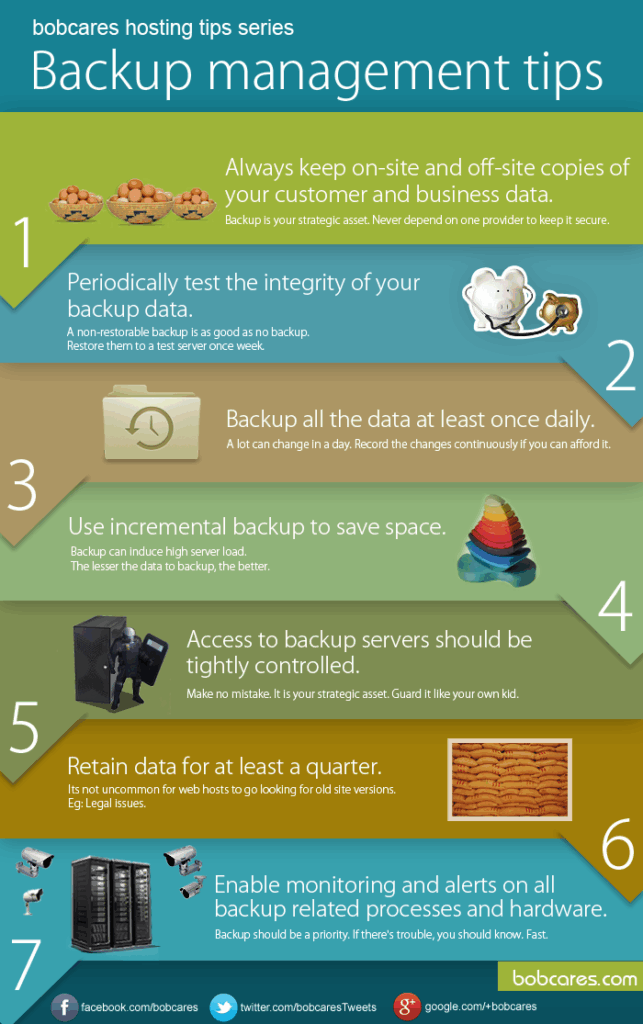
The best approaches for website hosting backups involve a mix of automated systems, cloud storage, and regular checks to ensure you can bounce back from any digital disaster. Think of it as building a virtual life raft; when things go south, you're not left swimming. In essence, start with reliable tools that automate the process, store data off-site, and include verification steps to confirm everything's intact. This way, you minimize downtime and keep your content safe without turning into a tech worrier.
Let's dive deeper into why this matters. In the world of web hosting, tools and resources are your best friends, acting like that reliable buddy who always has your back. From my own mishaps, I've learned that skipping backups is like forgetting to save your game right before the boss fight—devastating. Hosting platforms offer a ton of built-in features for data protection, and leveraging them can turn potential headaches into non-issues. For instance, services like cPanel or similar interfaces make it dead simple to set up routines that run in the background, so you can focus on creating content instead of crossing your fingers.
Why Backups Are Your Website's Secret Superhero
You might be thinking, "Do I really need this?" Well, imagine losing years of photos or customer data because of a simple hack or hardware failure. It's not just about the tech; it's about the stories and connections your site holds. According to some stats I've dug up, over 40% of businesses face data loss at some point, and many never fully recover. That's where hosting tools shine, offering features like incremental backups that only save changes, saving space and time. Tools from providers like SiteGround or Bluehost integrate seamlessly, making it feel less like a chore and more like a helpful habit.
Creative ways to monitor hosting performanceOne cool thing I like to reference is that meme about "it works until it doesn't." It's a lighthearted nod to how we often overlook backups until it's too late. In hosting, resources such as automated scripts or plugins for WordPress add that extra layer, turning your site into a fortress. They're not flashy, but they get the job done with minimal fuss, which is perfect for someone like me who prefers a relaxed vibe over constant monitoring.
Exploring Top Backup Strategies for Hosting
When it comes to strategies, variety is key—much like mixing up your playlist to keep things fresh. A solid website hosting backup approach might start with full backups, where everything gets copied periodically, but that's not always efficient. Instead, go for a hybrid: combine daily differentials with weekly full saves. This way, you're not overwhelming your storage while still covering your bases. Hosting resources like AWS S3 or Google Cloud Storage make this a breeze, offering scalable options that adapt as your site grows.
Then there's the off-site storage angle, which is like having a spare key hidden outside your house. By using cloud-based tools, you ensure that even if your main server goes down, your data's safe elsewhere. I once heard a story about a small business owner who avoided total loss by having their backups on a different provider—pure genius. To keep it relaxed, think about encryption too; it's that extra lock on the door that makes you sleep easier at night.
| Backup Strategy | Pros | Cons | Best For |
|---|---|---|---|
| Automated Daily Backups | Hands-off, reduces human error | May require more storage | Busy site owners |
| Cloud Storage Solutions | Accessible from anywhere, scalable | Potential costs for large data | Growing businesses |
| Manual Verification Checks | Ensures data integrity | Takes time to implement | Tech-savvy users |
Essential Tools and Resources to Get You Started
Now, let's talk tools—because what's a strategy without the right gear? In hosting, resources like BackupBuddy for WordPress or the built-in backup features in cPanel are game-changers. They're straightforward, often with user-friendly dashboards that don't require a degree in computer science. I remember fiddling with one for the first time; it felt like unlocking a new level in a game, all intuitive and rewarding.
In-depth comparison of various hosting typesFor a more relaxed setup, consider free resources from hosting providers, such as FTP tools for manual transfers or even simple scripts that run on a schedule. If you're into that, plugins like UpdraftPlus offer free tiers with solid features, blending ease with effectiveness. And hey, if you're feeling cultural, think of it like preserving family recipes; these tools keep your digital heritage alive.
Putting It All Together: A Simple Guide
Alright, let's break this down without overcomplicating things. Here's how to roll out a backup plan, step by step, in that easygoing way we all appreciate.
1Choose your hosting platform's backup tool and familiarize yourself with its interface—it's usually just a few clicks away.
2Set up automated schedules, like nightly backups, to keep things running smoothly without your constant input.
Advantages of SSD-based hosting options3Test your backups regularly by restoring a small file; it's like a dress rehearsal for the real show.
This approach keeps it light and effective, ensuring you're covered without the stress.
Frequently Asked Questions
Wrapping up with a few common queries to clear the air:
- How often should I back up my website? Ideally, daily for high-traffic sites, but at least weekly for smaller ones to balance safety and resources.
- Are cloud backups more secure than local ones? Generally yes, as they're off-site and often encrypted, reducing risks from physical issues.
- What if I can't afford premium tools? Start with free options like built-in hosting features or open-source plugins; they're surprisingly robust for beginners.
As we wind down, imagine your site as a trusty old bike—reliable, but it needs maintenance to keep rolling. So, why not give it the backup love it deserves? Dive into those tools and make your online world a little more carefree.
Guide to migrating to a new hosting serviceSi quieres conocer otros artículos parecidos a Best approaches for website hosting backups puedes visitar la categoría Hosting Tools and Resources.
Entradas Relacionadas