
In-depth comparison of various hosting types
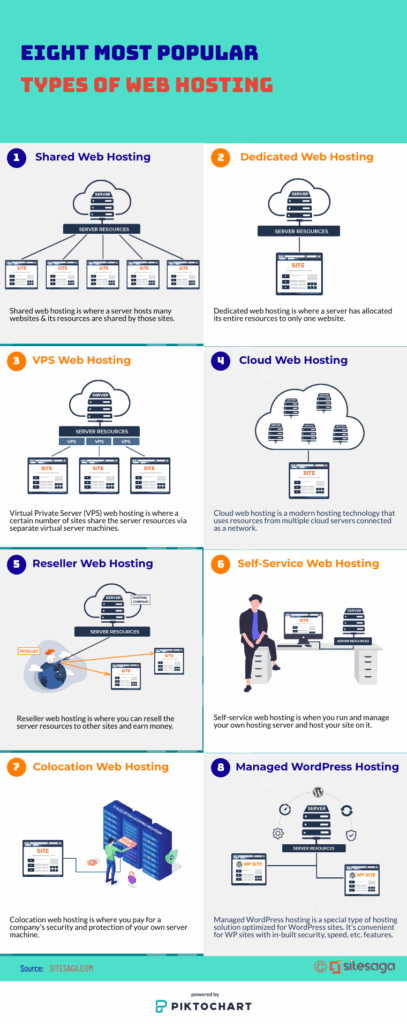
Ever had that moment when you're setting up a website and suddenly realize your hosting choice could make or break everything? I remember my first time—picture this: I was a newbie blogger, armed with big dreams and a laptop full of half-baked ideas, staring at a screen full of options that felt like picking the right flavor at an ice cream shop. Shared or dedicated? Cloud or VPS? It was overwhelming, but diving into it turned out to be a game-changer. Today, we're kicking back for an in-depth comparison of various hosting types, focusing on the tools and resources that can make your online life a breeze. Let's chat about this like we're grabbing coffee, keeping it relaxed and real.
In-depth comparison of various hosting types boils down to understanding how each option stacks up for your specific needs, whether you're running a small blog or a bustling e-commerce site. At its core, it's about balancing cost, performance, and flexibility. For starters, shared hosting is like rooming with a bunch of roommates—everyone shares the same space, which keeps things affordable but can lead to slowdowns if your neighbors get rowdy. On the flip side, dedicated hosting is your private penthouse; it's all yours, offering top-notch speed and security, but it comes with a heftier price tag that might make you wince.
Breaking Down the Basics of Hosting Types
Let's ease into this by painting a picture of the main players in the hosting world. You've got shared hosting, which is perfect for beginners dipping their toes in—think low costs starting at a few bucks a month and easy-to-use tools like cPanel for managing your site. Then there's VPS hosting, a step up that gives you more control, almost like upgrading to a studio apartment where you can tweak settings without affecting others. It's a sweet spot for growing sites, offering resources like scalable RAM and CPU, which are must-haves for tools such as WordPress plugins or e-commerce platforms.
Don't forget cloud hosting, which feels like magic in the digital age—it's all about flexibility, spreading your data across multiple servers so if one goes down, you're not left in the lurch. I once had a laugh with a friend over that viral meme of a server crashing like a house of cards; cloud hosting dodges that drama with its redundancy. And for the big leagues, dedicated hosting provides raw power, with resources dedicated solely to you, making it ideal for high-traffic sites or those needing advanced security tools like firewalls and SSL certificates.
Advantages of SSD-based hosting optionsKey Factors to Compare: Cost, Performance, and Scalability
When you're weighing these options, it's all about the nitty-gritty. Cost-wise, shared hosting won't break the bank, but if your site starts booming, you might outgrow it faster than expected. VPS strikes a balance, offering better performance for a mid-range price, while cloud and dedicated can scale with you but might require deeper pockets. Performance is where things get exciting—VPS and dedicated hosting shine with faster load times thanks to dedicated resources, whereas shared can lag during peak hours, which is a bummer for user experience.
Scalability is another biggie; cloud hosting takes the cake here with its on-demand resources, letting you ramp up during sales or events without a hitch. Tools like AWS or Google Cloud make this a cinch, providing dashboards and APIs that feel intuitive once you get the hang of them. In my own journey, switching to VPS for a side project was like unlocking a new level in a video game—it opened up resources for automated backups and monitoring tools that kept everything running smoothly.
| Hosting Type | Cost (Approx.) | Performance | Scalability | Best For |
|---|---|---|---|---|
| Shared Hosting | $2–$10/month | Basic, shared resources | Limited | Beginners and small sites |
| VPS Hosting | $10–$50/month | Improved, dedicated resources | Moderate | Growing businesses |
| Cloud Hosting | $5–$100+/month | High, scalable on demand | Excellent | Dynamic, high-traffic sites |
| Dedicated Hosting | $50–$200+/month | Top-tier, full control | High, with planning | Enterprise-level operations |
This table sums it up nicely—it's not just numbers; it's about matching your site's vibe to the right setup. For instance, if you're into tools like site builders or SEO plugins, cloud hosting's integration options are a dream.
Exploring Tools and Resources for Each Hosting Type
Digging deeper, every hosting type comes with its own arsenal of tools and resources that can make or break your experience. Shared hosting often includes user-friendly interfaces and free SSL certificates, which are great for starters. VPS ramps it up with root access, letting you install custom software or use advanced monitoring tools like New Relic for performance insights. Cloud hosting? Oh, it's a playground for automation—think Kubernetes for container management or serverless options that handle scaling without you lifting a finger.
Guide to migrating to a new hosting serviceAnd dedicated hosting brings out the big guns: enterprise-grade firewalls, custom configurations, and resources for big data tools. I once tinkered with a dedicated server for a friend's online store, and the ability to add specialized security plugins was a lifesaver. Resources like HostGator's guides or DigitalOcean's tutorials are gold mines, offering step-by-step breakdowns that feel like having a mentor in your corner.
Wrapping Up with Real-World Picks
As we wind down this chat, think about how these hosting types fit into your world—maybe you're like me, starting small and dreaming big. Cloud hosting might win for its adaptability, but if you're all about control, dedicated could be your jam. Whichever path you choose, dive into the resources out there; they're the unsung heroes that keep your site thriving.
Frequently Asked Questions
What's the main difference between shared and VPS hosting? Shared hosting shares server resources among users, making it cheaper but less reliable, while VPS gives you a virtual slice of a server for better performance and control, ideal for sites needing more power without the full commitment.
Is cloud hosting worth the extra cost? Absolutely, if your site has fluctuating traffic; it scales automatically and offers robust tools for backups and redundancy, potentially saving you headaches and money in the long run compared to traditional options.
Effective tools for hosting analytics overviewHow do I choose the right hosting tools? Start by assessing your site's needs—traffic volume, security requirements—and explore provider resources like free trials or comparison guides to test the waters before diving in.
Si quieres conocer otros artículos parecidos a In-depth comparison of various hosting types puedes visitar la categoría Hosting Tools and Resources.
Entradas Relacionadas