
Simple steps to troubleshoot hosting issues
Picture this: you're knee-deep in a project, your website's supposed to be live and kicking, but suddenly, it's as silent as a library at midnight. Yeah, hosting issues can turn your day upside down faster than a cat video going viral. I'm no stranger to this mess myself—I once spent a whole evening chasing a server error that turned out to be a simple misconfiguration, all while my coffee went cold. But hey, that's the beauty of tech; it's fixable, and today, we're diving into some straightforward ways to troubleshoot hosting woes with a relaxed vibe, like chatting over a virtual coffee break. We'll stick to tools and resources that make life easier, keeping things practical and real.
So, if you're scratching your head over hosting hiccups, the key is to start simple and build from there. Troubleshoot hosting issues by identifying the problem, using the right tools, and following a logical sequence of checks. In essence, it's about being methodical without overcomplicating things—think of it as debugging your way to a smoother online presence, ensuring your site stays up and running with minimal fuss. This approach can save hours and prevent those frustrating "down for maintenance" moments that no one enjoys.
Why Hosting Problems Pop Up and How to Spot Them
Hosting issues often sneak in like uninvited guests at a party, from server overloads to DNS mishaps. Imagine your server as a busy café; too many customers (traffic) and it grinds to a halt. In my experience, common culprits include bandwidth limits or outdated software, which can make your site unresponsive or slow as molasses. Tools like cPanel or hosting dashboards from providers such as SiteGround or Bluehost are lifesavers here—they let you monitor usage and spot red flags without diving into code jungles.
Resources abound for beginners; sites like HostGator's knowledge base or YouTube tutorials offer free guides that feel like a friendly hand on your back. I remember relying on a meme-filled forum thread that explained DNS propagation in relatable terms—think of it as your website's mail getting lost in transit. By using these, you not only identify issues but also build a toolkit for future headaches, making the whole process less intimidating and more empowering.
Strategies for high-availability hosting setupsMust-Have Tools for Your Hosting Arsenal
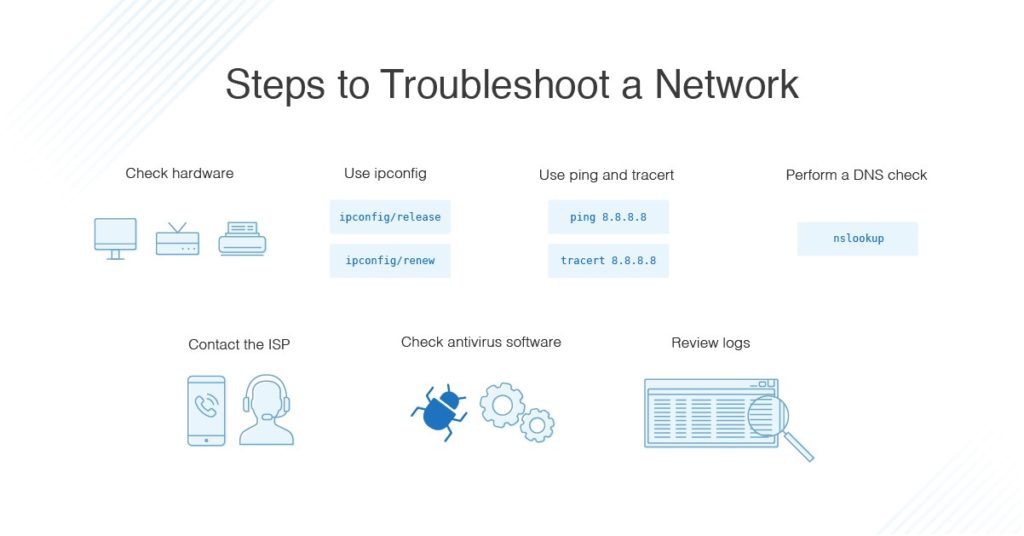
When it comes to tools, it's all about picking the ones that fit your style—like choosing sneakers for a jog. For hosting tools, start with ping tools and traceroute utilities to check connectivity; they're free and built into most operating systems. Then, amp it up with advanced resources like GTmetrix or Pingdom, which analyze performance and pinpoint bottlenecks with colorful reports that make data feel less dry.
Don't overlook open-source gems such as WP-CLI for WordPress users or SSH access for deeper dives—it's like having a master key to your server's inner workings. A quick story: I once used a simple FTP client to upload files and caught a corrupted file issue before it wrecked my site. To compare options, here's a quick table of popular tools:
| Tool | Best For | Ease of Use | Cost |
|---|---|---|---|
| cPanel | Beginner-friendly management | High | Free with hosting |
| GTmetrix | Performance analysis | Medium | Free tier available |
| SSH (via PuTTY) | Advanced troubleshooting | Low for newbies | Free |
This setup not only helps with immediate fixes but also equips you for ongoing maintenance, turning potential disasters into minor speed bumps.
Step-by-Step Guide to Fixing Things Up
Alright, let's get hands-on. Troubleshooting doesn't have to be a chore; it's more like following a recipe for a favorite dish. Start by checking the basics before escalating. Here's how, broken down into easy bites:
Ideas for green and sustainable hosting practices1Double-check your hosting dashboard for any alerts or downtime notices. It's often as simple as a quick login to see if your plan's resources are maxed out—like realizing you forgot to pay the bill on time.
2Use a ping tool to test your domain's reachability. Type in a command like "ping yourdomain.com" in your terminal; if it responds slowly or not at all, you might have a network issue worth escalating to your provider.
3Dive into error logs via your control panel. Look for phrases like "500 Internal Server Error" and search online forums for fixes—it's amazing how a community thread can turn a headache into a eureka moment.
4If it's a software conflict, update your CMS or plugins. Tools like WordPress's automatic updater can prevent issues, but always back up first to avoid any "oops" scenarios.
Common misconceptions about dedicated serversBy weaving in these steps with resources from reliable sites, you're not just fixing problems; you're building resilience. It's that satisfying click when everything aligns, like nailing a high-five in a video call.
Pro Tips for Staying Ahead of the Curve
Sometimes, prevention is the real hero. Resources like hosting forums or newsletters from DigitalOcean keep you in the loop on best practices. I like to reference pop culture here—think of your hosting setup as Iron Man's suit; regular maintenance keeps it battle-ready. Mix in automated backups and monitoring tools to catch issues early, turning potential outages into non-events.
Exploring Free Resources
Dive deeper with freebies like Google's PageSpeed Insights, which offers tailored advice without the price tag. It's a game-changer for optimizing your site alongside core hosting tools.
As we wrap up this journey through the hosting landscape, imagine the peace of mind when your site runs smoothly—it's like finally getting that perfect night's sleep. What if you turned these troubleshooting sessions into a routine adventure? Dive into more resources and keep your online world thriving.
Solutions for bandwidth throttling in hostingFAQ: Quick Answers to Common Queries
Q1: What are the best free tools for hosting troubleshooting? A: Start with cPanel for management and GTmetrix for performance checks; both are user-friendly and offer free tiers to help diagnose issues without extra costs.
Q2: How often should I check my hosting resources? A: Aim for weekly reviews, especially if your site gets traffic spikes, to catch problems early and keep everything running smoothly.
Q3: Can I troubleshoot without technical expertise? A: Absolutely—many hosting providers have intuitive dashboards and guides that make it accessible, turning beginners into confident handlers with a bit of practice.
Si quieres conocer otros artículos parecidos a Simple steps to troubleshoot hosting issues puedes visitar la categoría Hosting Tools and Resources.
Entradas Relacionadas