
Role of DNS in Email Delivery
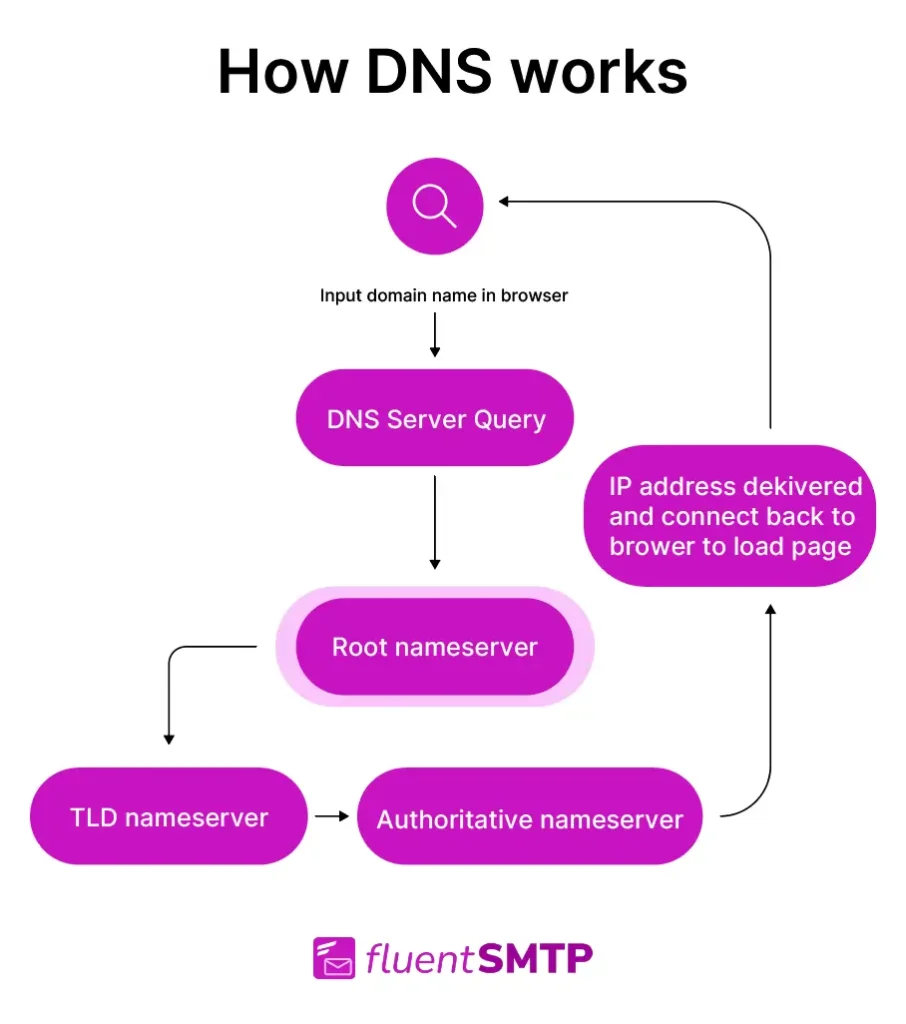
Picture this: You're firing off an important email to a client, only to find it bouncing back like a boomerang you didn't quite throw right. Frustrating, right? That's where the unsung hero of the internet, DNS, steps in—or stumbles, as the case may be. As someone who's spent way too many late nights troubleshooting domain woes, I can tell you that understanding the role of DNS in email delivery isn't just geeky tech talk; it's the key to smoother digital conversations. Let's dive into this together, keeping things light and straightforward, like chatting over coffee about why your messages sometimes go AWOL.
The core role of DNS in email delivery boils down to directing traffic behind the scenes. In simple terms, DNS, or Domain Name System, acts as the internet's address book, translating those friendly domain names into IP addresses that computers actually understand. When you hit send on an email, your server relies on DNS to find the right path, ensuring it lands in the recipient's inbox rather than cyberspace limbo. This process is crucial for avoiding delays or failures, and it's all about those specialized records that make the magic happen. Think of it as a postal service for the web—without accurate addresses, your letters just don't get there.
What Exactly is DNS and Why Should You Care?
DNS isn't some abstract concept; it's the backbone of how we navigate online, especially for things like email. At its heart, DNS converts human-readable domain names, like example.com, into machine-friendly IP addresses. But when it comes to email delivery, we're talking about specific components, such as MX (Mail Exchange) records, which tell the world where to route your emails. If you're running a website or managing domains, ignoring DNS is like ignoring the foundation of your house—eventually, things start to crack.
From my own experience, I once set up a small business site and forgot to configure the MX records properly. Emails piled up undelivered, and I was left scratching my head. It's a common pitfall, but once you grasp how DNS fits into the puzzle, it's like flipping on a light switch. For email, DNS ensures that your Simple Mail Transfer Protocol (SMTP) servers know exactly where to send and receive messages, preventing spam filters from flagging them or servers from rejecting them outright.
Quick Fixes for Domain Resolution ErrorsHow DNS Guides Email from Sender to Inbox
Let's break this down step by step, keeping it as relaxed as a weekend walkthrough. When you send an email, your device first queries the DNS to look up the recipient's domain. Here's where it gets interesting: The DNS server responds with the MX record, which points to the mail servers responsible for that domain. It's like asking for directions and getting a map that says, "Go to this address first."
1First, your email client connects to your outgoing SMTP server, which then performs a DNS lookup for the recipient's MX record.
2The DNS resolves this to the appropriate mail server IP, allowing the email to be transferred securely. If there's a mismatch or delay, that's when delivery fails—picture a traffic jam on the information highway.
3Finally, the receiving server checks for SPF (Sender Policy Framework) and DKIM (DomainKeys Identified Mail) records via DNS to verify authenticity and ward off spoofing. It's all interconnected, much like how a meme goes viral—starting small but relying on the right paths to spread.
Comparing Free and Paid Domain OptionsThis setup isn't just technical; it's a nod to how digital culture thrives on reliability. Remember that viral cat video email chain from the early 2000s? Without solid DNS, it might've never made it past the first forward. For anyone handling domains, mastering this can feel empowering, turning potential headaches into smooth operations.
Common DNS Pitfalls and How to Sidestep Them
Even with DNS's wizardry, things can go sideways. Propagation delays, where changes to DNS records take time to update worldwide, often cause email delivery issues. Or, mismatched records might lead to blacklisting, which is like getting your invitation lost in the mail. To compare, let's look at a quick table of DNS record types and their impact on email:
| Record Type | Role in Email | Potential Issues |
|---|---|---|
| MX Records | Direct emails to the correct server | Misconfiguration leads to undeliverable messages |
| SPF Records | Verify sender authenticity | Absence increases spam risk and blocks |
| DKIM Records | Sign emails for integrity | Errors can result in emails being flagged or rejected |
This comparison highlights how each element plays a part, much like ingredients in a recipe—skip one, and the dish falls flat. In the world of domains and DNS tutorials, staying on top of these means fewer surprises and more reliable communication.
Tips for Optimizing DNS for Better Email Performance
If you're diving into domain management, consider using tools like DNS checkers or services from providers like Cloudflare, which can streamline record setups. A personal tip: Always test your configurations with tools like MX Toolbox before going live—it's saved me from more than one panicked morning. By ensuring your DNS is optimized, you're not just fixing emails; you're building trust in your online presence, akin to a well-timed punchline in a conversation.
Benefits of Domain Mapping TechniquesAs we wrap up this journey through the DNS landscape, think about how this quiet system powers our daily interactions. Next time an email doesn't land, you'll have the insight to trace it back and fix it yourself—what a empowering thought, huh? It's all about that behind-the-scenes magic making the internet feel seamless.
Frequently Asked Questions
What is the most common DNS-related email problem? Often, it's outdated or incorrect MX records causing bounces. Double-check your domain settings regularly to keep things flowing.
How long does DNS propagation take for email changes? It can vary from minutes to 48 hours, depending on TTL settings, so patience is key when updating records.
Can DNS affect email security? Absolutely—records like SPF and DKIM help prevent phishing, making your emails more secure and trustworthy overall.
Myths Surrounding DNS Caching IssuesSi quieres conocer otros artículos parecidos a Role of DNS in Email Delivery puedes visitar la categoría Domain and DNS Guides and Tutorials.
Entradas Relacionadas