
Quick Tips on Transferring Domains Securely
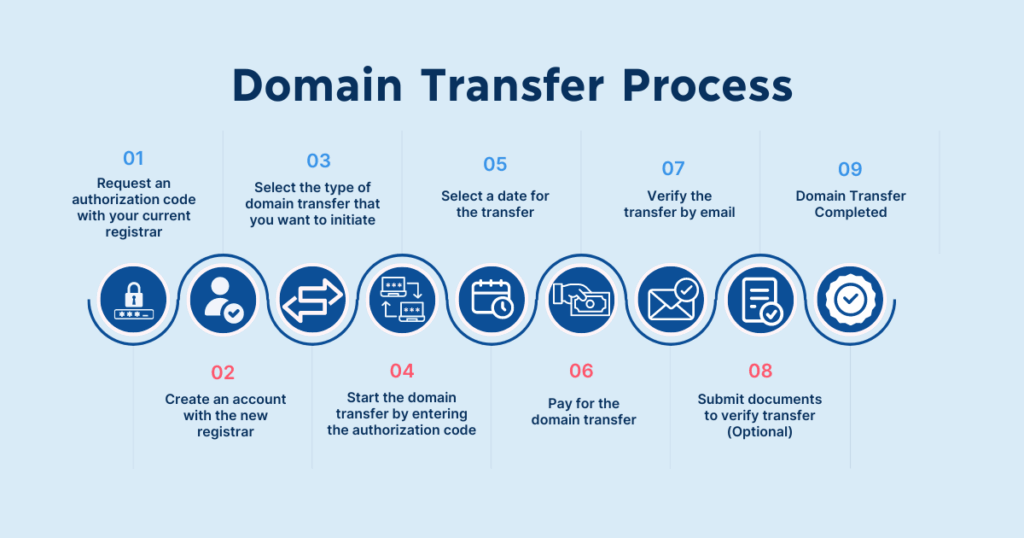
Ever tried moving your digital home base, like shifting that old family website to a snazzier neighborhood online? I remember when I first tackled transferring a domain—it felt like packing up boxes in the middle of the night, hoping nothing got lost in the shuffle. But hey, with a few smart moves, it's way less stressful than it sounds. Today, we're diving into quick tips for transferring domains securely, keeping things light and straightforward, because who needs extra headaches in the web world?
Quick tips on transferring domains securely boil down to a simple mantra: plan ahead, double-check everything, and keep your site's heartbeat steady. In essence, it's about making sure your domain hops from one registrar to another without a single glitch, protecting your data and online presence along the way. Think of it as a smooth road trip for your website—map out the route, fuel up properly, and you'll arrive without a scratch. This process ensures your domain stays yours, safe from any cyber bumps, and that's the core of what we're chatting about here.
Let's kick things off by getting a grip on why you'd even bother transferring a domain. Maybe your current registrar is hiking up prices, or you're eyeing better features elsewhere. Whatever the reason, the key is to do it securely to avoid downtime, lost emails, or worse, someone snatching your spot. Picture this: you're like a savvy homeowner upgrading to a better house, but you don't want the movers to drop your favorite lamp. That's where these tips come in, blending practical advice with a dash of that everyday wisdom we all appreciate.
Grasping the Essentials of Domain Hopping
Before we jump into the nitty-gritty, let's chat about what a domain transfer really entails. It's not just flipping a switch; it's a handshake between registrars, involving your domain's DNS settings and authentication codes. In the realm of domains and DNS tutorials, understanding this is like knowing the rules of the road before a drive. Your domain name is your address on the internet, and DNS is the directory that points traffic there. When transferring, you're essentially changing hosts but keeping the same address—simple, right?
Essentials of SSL Certificates for DomainsA crucial step? Get that authorization code, often called an EPP code, from your current registrar. It's like a secret key that unlocks the door for the move. Without it, you're stuck. And don't forget to check if your domain is locked; many registrars do this for security, so unlock it first. Oh, and timing matters—aim for a period when your site's traffic is low to minimize any potential hiccups. This isn't just textbook stuff; it's from real-world scenarios where a quick transfer turned into a minor adventure because someone overlooked the basics.
Step-by-Step: Safely Shifting Your Domain
Now, for the fun part—let's walk through the process with a relaxed vibe. I'll break it down into easy steps, like following a recipe for your favorite comfort food. Remember, we're sticking to domains and DNS guides here, so no wandering off topic.
1Start by logging into your current registrar's dashboard. Hunt down the transfer option—it's usually hiding in plain sight under account settings. Once you find it, unlock your domain if needed and grab that EPP code. Think of this as packing your essentials before the move.
2Head over to your new registrar's site and initiate the transfer request. You'll plug in your domain name and that EPP code. Double-check for any typos—it's like verifying the address on a package to ensure it doesn't end up in the wrong neighborhood.
Advanced DNS Settings for Performance3Verify your email because most registrars will send a confirmation. Approve it pronto to keep things rolling. At this stage, monitor your DNS settings; you might need to update them temporarily to point to your new host without interrupting service.
4Wait for the transfer to complete—it usually takes a few days. Use tools like WHOIS to track progress, and keep an eye on any notifications. Once done, update your DNS records if necessary to ensure everything flows smoothly, like rerouting mail after a house move.
This step-by-step isn't just a list; it's a narrative of how thousands navigate domain transfers daily. I once helped a friend with this, and seeing his site pop up seamlessly was like high-fiving after a well-played game.
Traps to Dodge and Pro Tips
In the world of domain and DNS tutorials, pitfalls are as common as plot twists in a binge-worthy series. One biggie? Forgetting to renew your domain before transfer, which could lead to expiration woes. Or, overlooking SSL certificates—transferring might disrupt them, so back them up or reissue as needed. It's like remembering to transfer your utilities when moving; otherwise, you're in the dark.
Guide to Setting Up Email with DomainsTo add some variety, let's throw in a quick table comparing popular registrars for secure transfers. This isn't exhaustive, but it highlights key features to keep your decision-making chill and informed.
| Registrar | Transfer Speed | Security Features | Cost |
|---|---|---|---|
| GoDaddy | 1-5 days | Two-factor authentication, auto-lock | Affordable, often promotional |
| Namecheap | 2-7 days | Free WHOIS protection, SSL options | Budget-friendly |
| Google Domains | 1-3 days | Strong privacy, easy integration | Competitive pricing |
Pro tip: Always use a secure connection and enable two-factor authentication during the process. It's like adding an extra lock to your door—simple but effective.
Wrapping Up with DNS Nuances
Once the transfer is done, don't forget about DNS configurations. These are the unsung heroes that direct traffic to your site, so tweaking them post-transfer can prevent any confusion. For instance, if you're running a blog, ensure your DNS points correctly to avoid 404 errors—it's like making sure the signposts lead to the right café.
In a nod to pop culture, think of DNS as the GPS in a spy movie; get it wrong, and you're lost. But with these tips, you're the hero of your own domain story.
Pros and Cons of Popular TLD OptionsQuick FAQ on Domain Shenanigans
What does a domain transfer typically cost? It varies, but expect to pay a one-time fee of $10-25 per domain, plus any renewal costs at the new registrar. Shop around for deals to keep it light on the wallet.
How long should I wait for a transfer? Most take 5-7 days, but it depends on registrars and verification. Patience is key, like waiting for your coffee to brew just right.
Is transferring domains safe? Absolutely, if you follow security best practices. Use strong passwords and monitor for phishing—it's as safe as crossing the street with a green light.
As we ease out of this guide, I'm left wondering: what's the next digital leap you're planning? Whether it's snagging a new domain or fine-tuning your DNS, here's to smooth sails ahead in your online journey.
Si quieres conocer otros artículos parecidos a Quick Tips on Transferring Domains Securely puedes visitar la categoría Domain and DNS Guides and Tutorials.
Entradas Relacionadas