
Essentials of SSL Certificates for Domains
Ever wandered into the digital woods of website setup and stumbled upon that little green lock in your browser's address bar? It's like finding a trusty guard dog for your online home, and that's exactly what an SSL certificate is for your domain. I'm chatting about this from my own messy adventures in web building, where I once ignored SSL and ended up with a site that screamed 'insecure' to every visitor. Let's dive into the essentials, keeping it chill and straightforward, because who needs tech jargon when we're just trying to keep things safe and smooth?
SSL certificates are basically the secret handshake that makes your website trustworthy. They encrypt the data zipping between your domain and your users, turning potential hackers' eavesdropping into gibberish. Imagine sending a postcard versus a sealed letter – that's the difference SSL makes. For anyone running a site, whether it's a blog or an online store, grabbing an SSL is like putting on a warm coat before stepping out into the cyber storm. In about 50 words, here's the core: SSL certificates secure your domain by enabling HTTPS, which encrypts sensitive info like logins and payments, boosts SEO rankings, and builds user trust, ensuring your site isn't just visible but genuinely safe from digital threats.
What Even is an SSL Certificate, Anyway?
Picture this: You're at a coffee shop, and you don't want anyone overhearing your conversation. SSL is like that privacy screen around your table. Technically, it stands for Secure Sockets Layer, though most folks now chat about its successor, TLS (Transport Layer Security). For your domain, an SSL certificate is a digital badge issued by a trusted authority that verifies your site's identity and activates encryption. It's not just a tech add-on; it's a fundamental part of modern web security, especially in the world of domains and DNS, where everything from email to e-commerce relies on it.
In the broader scope of domains and DNS tutorials, SSL fits in as the guardian of data integrity. When you type in a URL, DNS translates that domain name into an IP address, but SSL ensures that once you're connected, the chat is private. Think of DNS as the map to your house and SSL as the locked gate. Without it, you're exposing your visitors to risks like man-in-the-middle attacks, where sneaky code could intercept their info. And hey, in a world buzzing with memes about data breaches – remember that viral one with the cat hacking into emails? – it's more relevant than ever to get this right.
Advanced DNS Settings for PerformanceWhy Your Domain Needs SSL Like Coffee Needs Milk
Let's get real: No one wants to visit a site that their browser flags as "Not Secure." It's like showing up to a party with a sign that says "Enter at Your Own Risk." For domains, SSL isn't optional; it's essential for protecting user data, complying with regulations like GDPR, and even improving your search engine visibility. Google loves sites with HTTPS – that's the protocol SSL enables – so you'll rank higher if you've got it sorted.
From a DNS perspective, SSL works hand-in-hand with your domain's setup. Once you've registered your domain and configured DNS records, adding SSL is the next logical step to fortify that foundation. It's not just about avoiding those scary warning messages; it's about fostering trust. I once had a friend lose sales on his online store because customers bailed at the sight of an HTTP URL. SSL turns that frown upside down by assuring folks that their personal details are safe, much like how a good DNS setup ensures your site loads without a hitch.
Types of SSL Certificates: Picking the Right Fit
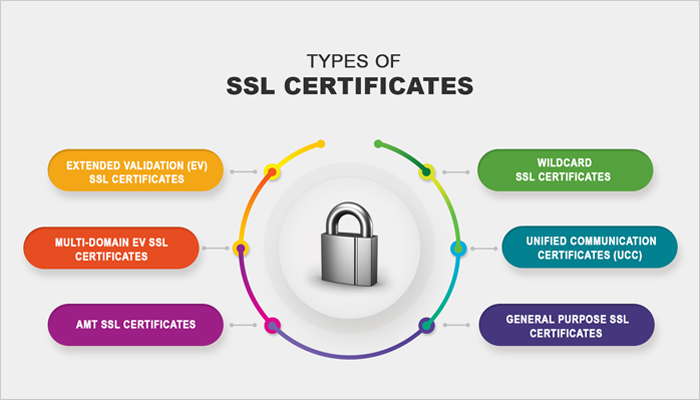
SSL isn't one-size-fits-all; it's more like choosing the perfect pair of shoes for a hike. There are domain-validated (DV) ones, which are quick and cheap but only verify ownership; organization-validated (OV), which dig deeper into your business creds; and extended validation (EV), the gold standard that turns your address bar green and builds maximum trust. For most domain tutorials, DV is a solid starting point if you're just testing waters, but if you're handling payments, go for OV or EV.
To compare, here's a quick table to help you decide, because who doesn't love a visual aid in a DNS guide?
Guide to Setting Up Email with Domains| Type | Validation Level | Best For | Cost |
|---|---|---|---|
| Domain Validated (DV) | Basic – just checks domain ownership | Personal blogs or small sites | Low |
| Organization Validated (OV) | Medium – verifies business details | E-commerce or professional sites | Medium |
| Extended Validation (EV) | High – full identity check | High-traffic sites like banks | High |
This variety means you can tailor SSL to your domain's needs without overcomplicating things, keeping your DNS setup streamlined and secure.
Step-by-Step: Getting SSL Up and Running on Your Domain
Alright, let's roll up our sleeves and get practical. Installing SSL might sound like wizardry, but it's straightforward once you break it down. First off, ensure your domain is pointed correctly via DNS – that's your groundwork.
1Choose a reputable SSL provider, like Let's Encrypt for free options or a paid one from your domain registrar.
2Generate a Certificate Signing Request (CSR) from your web host's control panel, which includes your domain details.
Pros and Cons of Popular TLD Options3Submit the CSR to your SSL provider and complete the validation process, which might involve verifying email or DNS records.
4Install the issued certificate on your server, then update your DNS to redirect HTTP traffic to HTTPS for seamless security.
5Test everything – visit your site and check for that green lock, fixing any mixed content issues where non-secure elements might slip through.
This process ties directly into DNS management, as you'll often need to add specific records like CAA for certificate authorities.
Troubleshooting Common Domain Issues EasilyQuick Tips to Keep Your Domain SSL-Ready
Beyond installation, think of SSL as ongoing maintenance for your domain. Renew certificates before they expire – most last a year or two. Also, monitor for vulnerabilities using tools like SSL Labs, and ensure your DNS settings support features like DNSSEC for extra protection. In the spirit of domain tutorials, remember that SSL isn't isolated; it's part of a bigger ecosystem where proper configuration prevents downtime and keeps users coming back.
Frequently Asked Questions
What's the difference between SSL and TLS? TLS is the updated version of SSL, offering better security. Most modern certificates are actually TLS, but we still call them SSL for simplicity. Always opt for the latest to keep your domain safe.
Do I need SSL for a non-commercial site? Absolutely, even for personal blogs. It protects user privacy and avoids browser warnings, plus it's free with options like Let's Encrypt, making it a no-brainer in any domain guide.
Can SSL affect my site's speed? Initially, yes, but modern implementations are optimized, and the security benefits far outweigh any minor slowdown. Plus, with proper DNS setup, you can minimize impact.
As we wrap this up, imagine your domain as a cozy campfire – SSL is the circle of stones that keeps it contained and safe. What if you took that next step today and fortified your online presence? It's not just about tech; it's about building real connections in this wild web world.
Si quieres conocer otros artículos parecidos a Essentials of SSL Certificates for Domains puedes visitar la categoría Domain and DNS Guides and Tutorials.
Entradas Relacionadas