
What is DNS and How It Functions
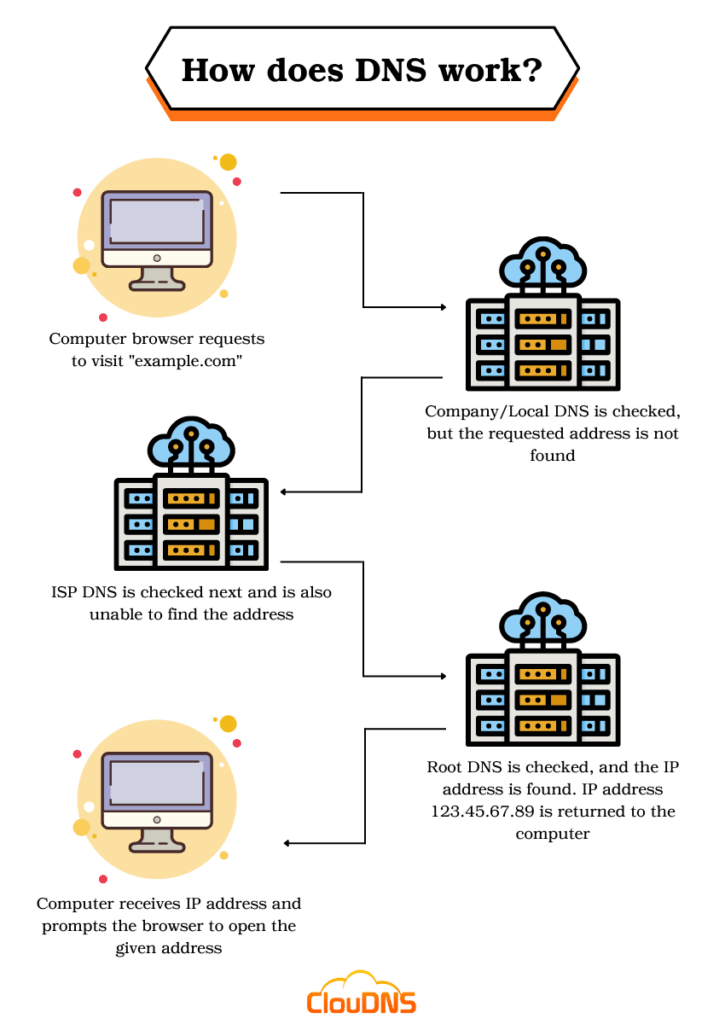
Ever had one of those moments where you're typing away on your keyboard, hunting for your favorite cat video site, and you just... poof, it loads? Magic, right? Well, not really—it's all thanks to this unsung hero called DNS. Imagine if every time you wanted to chat with a friend, you had to memorize their full address instead of just their name. That's DNS in a nutshell, making the internet feel less like a math class and more like a friendly neighborhood stroll. Stick around, and I'll break it down for you in a way that won't put you to sleep.
DNS, short for Domain Name System, is basically the internet's trusty translator. It turns those memorable website names—like www.example.com—into the actual numerical addresses that computers understand. Think of it as your phone's contacts list; instead of dialing a bunch of digits, you just punch in a name. Without DNS, we'd all be stuck memorizing strings of numbers, which sounds about as fun as organizing your sock drawer. What is DNS? It's the backbone that keeps the web navigable, ensuring that when you search for "best coffee recipes," you don't end up in a digital black hole.
Here's a quick hit to answer your burning question: DNS, or Domain Name System, acts as the internet's directory service, converting human-friendly domain names into machine-readable IP addresses. This process happens in milliseconds, allowing seamless browsing without you ever thinking about it. It's what makes the web user-friendly, turning complex networks into simple clicks and searches. (That's about 45 words, straight to the point for when you're skimming results.)
The Magic Behind DNS: A Laid-Back Look
Let's dive deeper without getting too technical—I'm not here to overwhelm you with jargon. Picture DNS as a massive, global Rolodex that started way back in the 1980s when the internet was just a geeky experiment. Back then, people had to manually edit files to connect to sites, which was about as efficient as sending a letter by carrier pigeon. Fast forward to today, and DNS handles billions of queries every day, from your morning news check to late-night meme scrolls. It's evolved into a distributed network of servers, each holding pieces of the puzzle, making sure everything runs smoothly.
Best Practices for Domain Security MeasuresWhat makes this system so clever is its hierarchy. At the top, you've got the root servers, like the bosses overseeing the whole operation. Then there are the top-level domain servers for things like .com or .org, and finally, the authoritative servers that know the specifics for individual sites. It's a team effort, really, with your computer sending out requests and getting responses in a flash. I remember the first time I grasped this; I was troubleshooting a slow connection and realized DNS was the culprit—kind of like finding out your phone's autocorrect was messing with your messages.
How DNS Actually Works: Step by Step, No Sweat
Okay, let's walk through this like we're chatting over coffee. When you type a URL into your browser, here's what goes down behind the scenes:
1Your browser sends a query to a DNS resolver, often provided by your internet service provider. It's like asking a friend for directions before you head out.
2The resolver checks its cache first—if it has the info, great, you're good to go. No cache? It climbs the DNS hierarchy, starting with the root servers to find the right IP address.
Resolving Name Server Conflicts Swiftly3Once it gets the authoritative answer, it stores it for future use and sends it back to your browser. Boom, your page loads, and you never knew the drama that just unfolded.
This recursive process is what we call DNS resolution, and it's lightning-fast—usually under a second. But hey, if you've ever dealt with a "DNS lookup failed" error, you know it can throw a wrench in things, like when your GPS decides to take a nap mid-trip.
Common DNS Hiccups and Quick Fixes
Even the best systems have off days, and DNS is no exception. Sometimes, you'll face issues like slow resolution or outright failures, which can stem from overloaded servers or misconfigurations. It's like when your favorite streaming service buffers right at the plot twist. A neat way to visualize this is through a simple comparison table:
| Problem | Cause | Quick Fix |
|---|---|---|
| Slow DNS Response | High traffic or distant servers | Switch to a faster DNS provider like Google DNS (8.8.8.8) |
| DNS Leak | Unsecured VPN usage | Check and configure your VPN settings properly |
| Cache Poisoning | Malicious interference | Use secure DNS options like DNS over HTTPS |
Flushing your DNS cache is a go-to trick—on Windows, it's as easy as running a command in the prompt, and on Mac, you restart the mDNSResponder. It's one of those "why didn't I think of that?" moments that keeps things running smoothly in the domain world.
Differences Between DNS Hosting ServicesWhy DNS is a Big Deal in the Domain Game
Beyond just loading pages, DNS plays a pivotal role in everything from email delivery to securing online transactions. It's what enables subdomains, like blog.example.com, and supports modern features like dynamic DNS for home servers. If you're into web development or managing domains, understanding DNS is like having a secret map to the internet's treasure. I once set up a personal site and marveled at how tweaking DNS records changed everything—it's empowering, in a geeky sort of way.
And let's not forget the cultural side; DNS has even popped up in memes, like those joking about "DNS errors in relationships" when communication breaks down. It's a reminder that even in our digital age, reliable connections are key, whether online or in real life.
Frequently Asked Questions
Q1: What's the difference between DNS and a domain registrar? A domain registrar is where you buy and manage your domain names, like GoDaddy or Namecheap. DNS, on the other hand, handles the translation of those names into IP addresses—think of it as the engine versus the keys to the car.
Q2: Can I use a custom DNS for better privacy? Absolutely! Services like Cloudflare's 1.1.1.1 offer encrypted DNS to keep your queries private from prying eyes, which is super handy in today's data-conscious world.
Overlooked Aspects of Domain OwnershipQ3: How does DNS affect website speed? A lot! Faster DNS resolution means quicker load times, especially if you're using a reliable provider. It's one of those behind-the-scenes tweaks that can make your site feel snappier without major overhauls.
As we wrap this up, think about how DNS quietly powers your daily online adventures—it's the unsung sidekick in your internet story. What if you experimented with a different DNS setup next time you're tweaking your browser? It might just surprise you how much smoother things get.
Si quieres conocer otros artículos parecidos a What is DNS and How It Functions puedes visitar la categoría Domain and DNS Guides and Tutorials.
Entradas Relacionadas