
How DNS Operates in Simple Steps
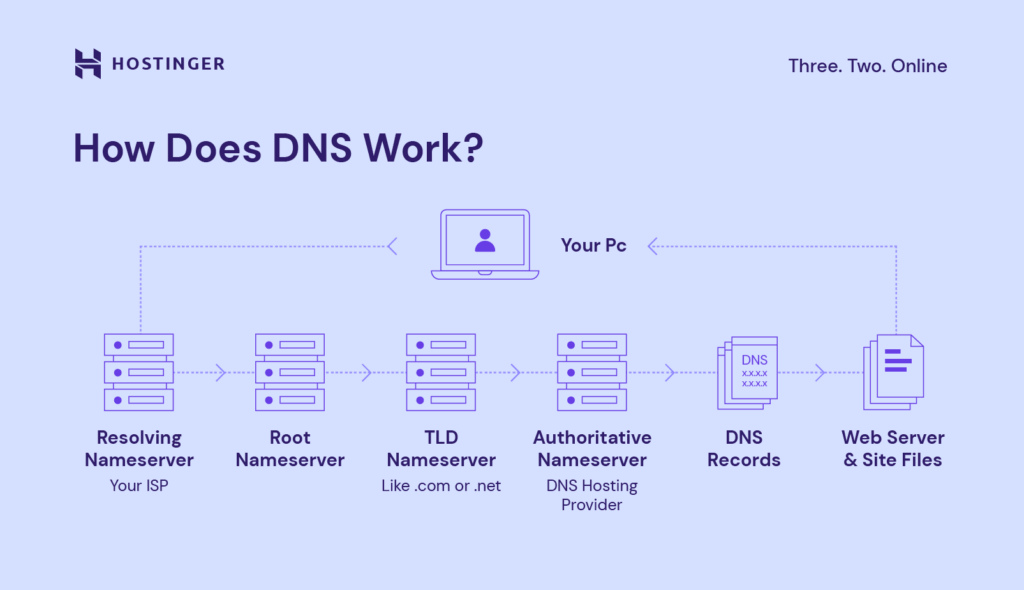
Ever had one of those moments where you're typing away on your computer, hunting for your favorite cat video, and suddenly the internet just... shrugs? Yeah, me too. It's like your device is playing hard to get, and that's often DNS stepping in—or stumbling, as the case may be. But don't worry, we're about to unpack how this whole DNS thing works in a laid-back way, without the tech jargon overload. Imagine DNS as that trusty old friend who knows everyone's address book; it turns your casual "hey, website!" into a precise digital knock on the right door. In simple terms, DNS, or Domain Name System, is the internet's address translator that makes sure "www.example.com" doesn't turn into a wild goose chase for your IP address. And here's the quick scoop: DNS operates by taking your domain name query, breaking it down through a series of servers, and fetching the correct IP so your browser can load the page—usually in a blink. That's the magic in about 45 words, straight up.
Alright, let's ease into this. I remember the first time I really grasped DNS; it was during a rainy afternoon when my Wi-Fi decided to revolt. I was trying to stream a show, and nothing would load. Turns out, my router was having a DNS hiccup. It's funny how something so invisible can trip us up daily. DNS isn't some sci-fi wizardry; it's more like the postal service of the web. You scribble an address on an envelope (that's your domain name), and DNS figures out the exact house number (the IP address) to deliver your request. Cool, right? This system keeps the internet from being a mess of numbers we'd never remember.
Why DNS Feels Like Magic, But Isn't
At its core, DNS is all about making the internet user-friendly. Without it, we'd be memorizing strings like 192.168.1.1 just to check email—yikes, talk about a headache. Think of it as a massive, global phonebook that updates in real-time. When you type a URL, your device doesn't inherently know where that site lives; it pings DNS servers to ask, "Hey, what's the IP for this domain?" These servers, spread across the world, work in a hierarchy: starting from your local resolver, bouncing to root servers, then to authoritative ones. It's a relay race, but way faster than any Olympic event.
To keep things lively, let's throw in a metaphor. DNS is like ordering coffee at a bustling café. You say, "I'll have a latte," and the barista (your computer) checks with the manager (DNS resolver) who consults the recipe book (root servers) to find the exact blend (IP address). By the time your drink arrives, it's seamless. But if there's a mix-up, like a outdated entry, you're left waiting—or worse, with the wrong order. That's where DNS caching comes in; it stores recent lookups so repeats are quicker, almost like remembering your usual brew without asking.
How DNS Operates in Simple StepsBreaking Down the Steps: A Chill Walkthrough
Okay, let's get to the heart of it. How does DNS actually operate? We'll keep this straightforward, like chatting over coffee. I'll walk you through the basic steps, one by one, so you can visualize it without feeling overwhelmed. Remember, this isn't rocket science; it's just a sequence that happens lightning-fast every time you go online.
1First off, your browser sends a query to the DNS resolver on your device or network. This is like whispering to a friend, "Where's that party at?" The resolver is your local guide, often provided by your ISP.
2If the resolver doesn't have the answer cached, it hits up the root servers. These are the big bosses, directing traffic to the right domain extensions, like .com or .org. It's a quick check, almost like asking for directions at a crossroads.
3Next, the root server points to a TLD server—think Top-Level Domain, like the one for .com. This server then guides the resolver to the authoritative name server, which holds the actual IP address for the domain you're after.
Custom DNS for Subdomains Demystified4Finally, the authoritative server responds with the IP address. Your resolver caches this info for future use and sends it back to your browser. Boom—your page loads, and you're browsing away. It's that recursive loop that makes everything tick.
Of course, things can get quirky. Ever heard of DNS propagation? It's like when you move to a new house, and it takes a bit for the mail to catch up. If you're updating domain settings, it might lag a few hours. But hey, that's the internet for you—full of surprises.
A Real-World Spin: DNS in Everyday Life
Let's make this relatable with a quick story. Picture me, a few years back, setting up a blog. I bought a domain, fiddled with DNS settings, and suddenly my site was live. But when I shared the link, my friends couldn't access it right away. Turns out, I forgot about DNS propagation delays. It's like throwing a party and forgetting to tell the neighbors; everything works once the word spreads. In pop culture terms, it's reminiscent of how memes go viral—starting small and exploding once the servers catch on. DNS keeps the web's social fabric intact, ensuring your online hangouts are always reachable.
Diving deeper, domain and DNS tutorials often highlight how security plays a role. With threats like DNS spoofing, it's wise to use secure options like DNS over HTTPS. This encrypts your queries, making your browsing as safe as locking your front door. For anyone managing domains, tools like WHOIS or control panels from registrars are your best friends, offering insights into records and configurations.
When to Use Dynamic DNS EffectivelyWrapping Up with a Thoughtful Nudge
As we wrap this up, imagine the next time you're doom-scrolling or working online, giving a silent nod to DNS for making it all possible. It's the unsung hero of the internet, turning chaos into clicks. Why not experiment with your own DNS settings? Try a public server like Google's for faster speeds and see how it feels. Your digital adventures might just get a whole lot smoother.
Quick FAQ for DNS Curious Folks
What is the difference between a domain and DNS? A domain is like your website's name tag, while DNS is the system that translates that name into an IP address for connectivity. Think of the domain as the address on the envelope and DNS as the delivery service.
How can I check if my DNS is working properly? Simple—use tools like nslookup or ping in your command prompt. If you get a response, you're good; if not, it might be time to flush your DNS cache or contact your provider.
Why does DNS sometimes make websites load slowly? It could be due to outdated records, network congestion, or even geographic distance from servers. Optimizing with a better resolver can often speed things up, like upgrading from a bike to a car for your data trips.
Exploring Domain Forwarding FeaturesSi quieres conocer otros artículos parecidos a How DNS Operates in Simple Steps puedes visitar la categoría Domain and DNS Guides and Tutorials.
Entradas Relacionadas