
Critical Factors for Hosting Scalability
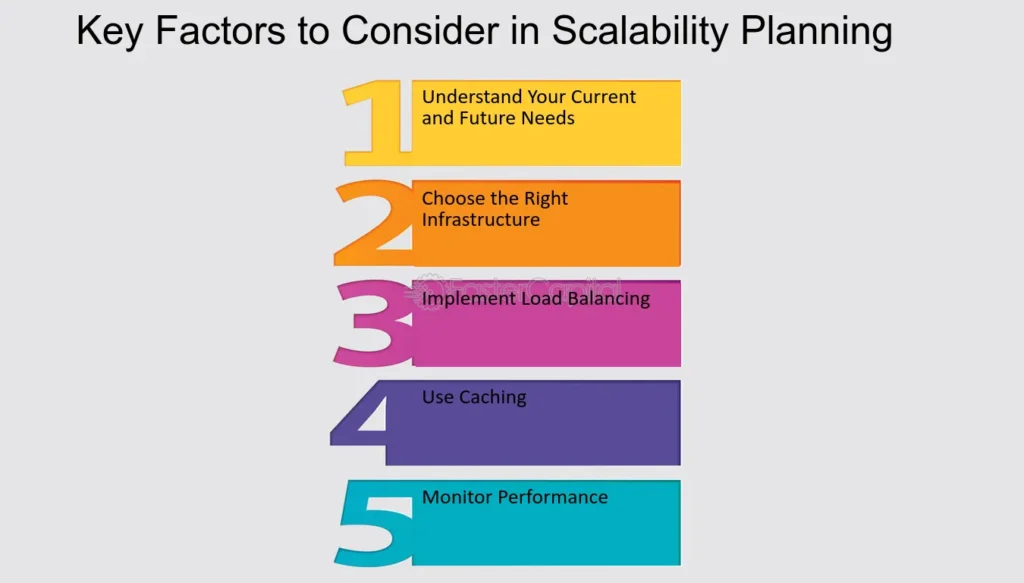
Ever had that moment when your website suddenly gets a surge of visitors—like a viral post or a big sale—and it just crashes? Yeah, I've been there, staring at my screen thinking, "What the heck happened?" It's not just frustrating; it's a wake-up call about hosting scalability. If you're diving into the world of web hosting, getting this right means your site can grow without breaking a sweat. Let's chat about the critical factors for making your hosting setup as flexible as a yoga instructor, keeping things light and practical along the way.
Hosting scalability isn't just tech jargon; it's about ensuring your server can handle more traffic, data, or users without you pulling your hair out. In a nutshell, it's preparing for growth while keeping costs and complexity in check. Picture this: you're running an online store, and suddenly, everyone's buying your stuff. The key is having a system that scales up smoothly, like adding more lanes to a highway during rush hour. That way, you avoid the slowdowns and crashes that turn excited customers into frustrated ones.
Why Scalability Matters More Than You Think
Okay, let's get real—most folks don't think about scalability until it's too late. I remember tinkering with my first blog; it was fine with a handful of readers, but when I shared it on social media, boom, everything slowed to a crawl. That's the beauty of proper hosting configuration: it anticipates spikes. Critical factors for hosting scalability start with understanding your traffic patterns. Tools like Google Analytics can show you peaks and valleys, helping you optimize resources without overkill.
From a relaxed perspective, think of scalability as planning a party. You don't want to run out of snacks midway, right? So, optimizing your hosting involves monitoring server loads and adjusting configurations accordingly. Use services that offer auto-scaling, where resources ramp up automatically based on demand. This not only saves you from manual tweaks but also keeps your site humming along, even during unexpected surges.
Simple Hacks for Better Hosting ManagementKey Configuration Steps for Smooth Scaling
Alright, let's break this down without getting too nerdy. First off, when you're setting up your hosting, focus on server configuration basics. Start with choosing the right type—shared hosting might work for small sites, but for scalability, virtual private servers (VPS) or cloud options like AWS or Google Cloud are your best buds. They let you allocate resources dynamically.
1Assess your current setup: Check CPU, RAM, and storage. If you're always hitting limits, it's time to upgrade or redistribute loads. For instance, move static files to a CDN to ease the burden on your main server.
2Implement load balancing: This is like having multiple waiters at a restaurant so no one gets overwhelmed. Distribute traffic across several servers to prevent any single one from crashing under pressure.
3Optimize your software: Keep your CMS or apps updated. Things like caching plugins for WordPress can make a huge difference, reducing server requests and speeding things up. It's like decluttering your digital closet—no unnecessary junk slowing you down.
In-Depth Look at Hosting Migration ProcessesDon't forget about database optimization; it's often the sneaky culprit. Indexing tables and using efficient queries can turn a sluggish site into a speedy one. And hey, if you're into memes, think of it as leveling up your server's "fitness routine" so it doesn't get winded during a traffic marathon.
Optimization Techniques That Keep Things Effortless
Now, let's talk about the fun part—making your hosting as efficient as a well-oiled machine. Hosting optimization involves fine-tuning for better performance. For example, resource allocation is key; allocate just what you need to avoid wasting money, but have the flexibility to scale. Cloud hosting shines here because it's like renting a flexible office space—you pay for what you use.
Ever heard of containerization with Docker? It's a game-changer for scalability, packaging your app and its dependencies into a container that runs anywhere. This means you can deploy updates without downtime, keeping your site reliable. Or, if you're feeling cultural, it's like modular furniture; easy to expand or rearrange as your needs evolve.
To add some depth, consider security in your optimization strategy. Scalable hosting isn't just about handling more traffic; it's about doing so safely. Use firewalls and regular backups to protect against breaches, especially as your site grows. A real-world analogy: It's like fortifying your house as the neighborhood gets busier—no one wants uninvited guests crashing the party.
Evaluating Hosting for Ecommerce Sites| Factor | Why It Matters | Tips for Optimization |
|---|---|---|
| Traffic Monitoring | Prevents overloads during peaks | Use tools like New Relic for real-time insights |
| Auto-Scaling | Automates resource adjustment | Set thresholds in your cloud provider's dashboard |
| Cost Efficiency | Avoids unnecessary expenses | Opt for pay-as-you-go models and monitor usage |
Overcoming Common Pitfalls with a Relaxed Mindset
Sometimes, scalability trips people up with unexpected issues, like compatibility problems or vendor lock-in. But hey, approach it with a chilled vibe—test your setup in staging environments before going live. It's like rehearsing a band performance; iron out the kinks so the show goes on without a hitch.
In wrapping up this chat, think about how critical factors for hosting scalability can transform your online presence from a fragile setup to a robust empire. Whether you're a blogger or running an e-commerce site, getting this right means more growth and less stress.
FAQ: Quick Answers to Your Burning Questions
What is the best hosting for scalability? Cloud-based hosting like AWS or Azure is ideal because it offers flexible resources that scale with your needs, without the rigidity of traditional servers.
How often should I optimize my hosting? Regularly, especially after traffic spikes or updates—aim for quarterly reviews to keep everything running smoothly and adapt to changes.
Preventing Downtime with Proper ConfigurationCan small sites benefit from scalability features? Absolutely! Even if you're starting small, building in scalability prevents future headaches and makes expansion effortless as your audience grows.
As we part ways, imagine scaling your hosting as planting a seed that could grow into a mighty tree—it's all about the right soil and care. What's your next move to level up your setup?
Si quieres conocer otros artículos parecidos a Critical Factors for Hosting Scalability puedes visitar la categoría Hosting Configuration and Optimization.
Entradas Relacionadas