
Best practices for multi-site hosting management
Picture this: I'm sitting at my desk, coffee in hand, staring at a dashboard that controls not one, but five different websites for my side hustles. It's like juggling flaming torches—thrilling, but one wrong move and everything could go up in smoke. Managing multi-site hosting doesn't have to be that dramatic, though. If you're in the same boat, knee-deep in domains and servers, let's chat about the best practices for multi-site hosting management in a way that feels more like a friendly coffee break than a tech tutorial overload.
Best practices for multi-site hosting management boil down to smart choices that keep your sites running smoothly without pulling your hair out. In essence, it's about picking the right tools, staying organized, and scaling wisely to handle multiple sites efficiently. This approach not only saves time but also prevents common pitfalls like downtime or security breaches—think of it as building a safety net for your online empire, one site at a time.
Alright, let's dive deeper. First off, multi-site hosting is basically a setup where you host several websites on the same server or platform, often sharing resources to cut costs and simplify management. It's a game-changer for bloggers, e-commerce folks, or anyone with a portfolio of sites. But here's the thing: without the right strategies, it can turn into a messy tangle of code and confusion. I remember when I first tried this; my sites were like siblings fighting over the Wi-Fi—constant conflicts and slowdowns. That's why understanding the basics is key before you scale up.
Why Multi-Site Hosting Needs a Chill Approach
In the world of hosting, multi-site setups can feel overwhelming, but approaching it with a relaxed mindset makes all the difference. Imagine your server as a cozy apartment building—each site is a tenant with its own space, but they all share the utilities. The best practice here is to choose a hosting provider that supports this model seamlessly, like those offering WordPress multisite or cloud-based solutions from AWS or Google Cloud. These tools let you manage everything from one dashboard, reducing the headache of logging into multiple accounts. And hey, if you're into memes, think of it as the "Avengers assemble" of your websites—bringing them together without the epic battles.
Exploring free tools for hosting managementTo keep things running smoothly, always monitor resource usage. Overloading a shared server is like cramming too many people into a small elevator; it might work for a bit, but eventually, someone's going to get stuck. Tools like cPanel or Plesk make this easy with intuitive interfaces that track bandwidth, storage, and CPU. By keeping an eye on these, you avoid surprises and ensure each site gets its fair share.
Essential Tools That Make Life Easier
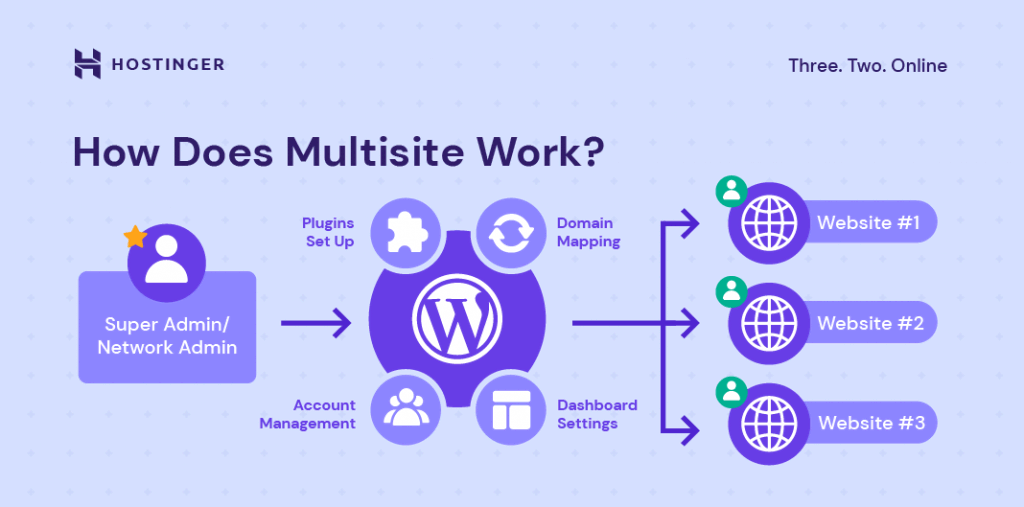
When it comes to tools for multi-site hosting, there are some real MVPs that deserve a shoutout. For instance, content management systems like WordPress Multisite allow you to run multiple sites from a single installation, which is perfect for networks of blogs or stores. It's like having a Swiss Army knife in your toolkit—versatile and always ready. Then there's monitoring software such as Uptime Robot or New Relic, which keep tabs on your sites 24/7, alerting you to issues before they escalate.
If you're dealing with more technical stuff, don't overlook automation tools. Scripts or plugins that handle backups, updates, and even SSL certificates can save you hours. I once set up an auto-backup system that runs nightly; it's like having a night watchman for your digital assets. And for a bit of cultural nod, it's reminiscent of those old-school IT guys in movies who fix everything with a few keystrokes—except now, it's you, feeling like a pro.
| Tool | Key Features | Best For |
|---|---|---|
| WordPress Multisite | Shared admin, easy scaling, plugin management | Bloggers and content creators |
| cPanel | Resource monitoring, file management, one-click installs | General web hosting needs |
| AWS Lightsail | Cloud scalability, affordable plans, automatic backups | High-traffic or growing sites |
Putting Best Practices into Action
Now, let's get practical. One top practice is prioritizing security across all sites—because in multi-site hosting, a breach on one can affect the others, like a chain reaction in a domino setup. Use strong passwords, enable firewalls, and regularly update software. It's as straightforward as locking your doors at night, but for your online world. Another is optimizing for performance; compress images, use caching plugins, and distribute traffic with CDNs to keep everything speedy.
In-depth look at hosting SLA agreements1Start by auditing your current setup: List all sites, their traffic levels, and resource needs to identify bottlenecks.
2Choose scalable hosting: Opt for plans that grow with you, avoiding the pain of migrating later—it's like upgrading from a studio apartment to a house without moving boxes.
3Implement regular maintenance routines, such as weekly checks, to catch issues early and keep your sites humming along effortlessly.
Resources to Level Up Your Game
Beyond the basics, dive into resources that can supercharge your multi-site management. Online communities like Reddit's r/webhosting or forums on SitePoint offer real-world advice and troubleshooting tips. For deeper learning, check out guides from hosting providers or free courses on platforms like Coursera about cloud computing. These aren't just dry reads; they're like having a mentor in your pocket, sharing stories of successes and fails to guide you.
Benefits of container-based hosting like DockerAnd if you're feeling adventurous, experiment with open-source tools like Docker for containerizing your sites, which adds a layer of flexibility. It's a bit like customizing your car—once you get the hang of it, the possibilities are endless, but start small to avoid any crashes.
FAQs on Multi-Site Hosting
Q1: What should I do if one site affects the performance of others? A: Isolate the issue by checking resource usage and consider upgrading to a more robust plan or using virtual private servers to compartmentalize sites, ensuring one doesn't drag down the rest.
Q2: Are there cost-effective resources for beginners? A: Absolutely—start with free trials from providers like Bluehost or DreamHost, and explore YouTube tutorials or the official documentation for hands-on learning without breaking the bank.
Q3: How often should I back up my multi-site setup? A: Aim for daily backups if your sites are active, using built-in tools or services like Backblaze, to protect against data loss and keep everything secure.
Path to effective DNS setup for hostingAs we wrap this up, think about how these practices could transform your hosting routine into something almost effortless—maybe even fun. What if you turned multi-site management into your secret superpower? Go on, give it a shot and watch your online presence thrive.
Si quieres conocer otros artículos parecidos a Best practices for multi-site hosting management puedes visitar la categoría Hosting Tools and Resources.
Entradas Relacionadas